Keypad & Door Lock (Sifely S)
Simple steps to unlock, lock, and troubleshoot the keypad.
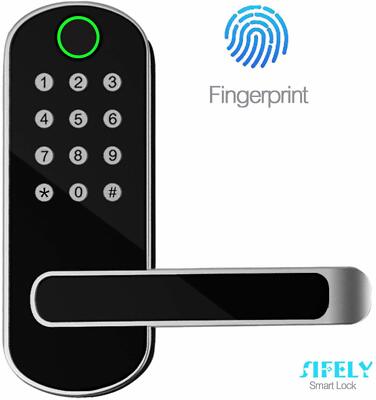
1) Unlocking the Door
- Wake the keypad by tapping anywhere on the touch surface below the top circle (fingerprint sensor).
🚫 Avoid the fingerprint circle. It isn't enabled for guests and will fail. Repeated failures can time-out the keypad for ~5 minutes.
- Enter your 4-digit code from your Airbnb messages, then press the # key once to confirm.
- # is the “enter” key and must be included.
- Do not press # twice.
- When accepted, you'll hear a beep and the latch will open. Turn the handle and enter.
2) Locking the Door
The lock auto-locks a few seconds after the door is closed.
✅ Tip: Make sure the door is fully closed so auto-lock can engage.
3) Troubleshooting
- Code not working? Confirm the exact code from Airbnb, including the # at the end. Avoid the fingerprint sensor.
- Low battery alert: The lock may beep or show a low-battery icon. It will still work for your stay—please message me so I can swap batteries.
- Too many failed attempts: If the keypad locks out, wait ~5 minutes and try again.
4) Security Notes
- Do not share your code outside your reservation.
- Your code expires automatically at check-out.
- Always ensure the door is closed when leaving so auto-lock can engage.